
Timeshare Booking Guidance
How Timeshare Booking Windows Work
A booking window tells you when you may request a reservation—not whether the vacation you want will actually be available.
Reservation timing may depend on the ownership, home resort, program, benefit level, Use Year, or booking channel. Travel clubs that access regular hotel inventory may operate differently. Understanding which rule controls your reservation can help you determine whether the problem is timing, eligibility, or limited inventory.
About this guidance: Timeshare Travel Club Authority’s guidance is based on current owner-facing materials, program rules, booking disclosures, fee information, and experience evaluating timeshare, vacation-club, and travel-club reservation systems. Booking windows, priority periods, Use Year rules, fees, and inventory access may vary or change. Owners should verify the rules attached to their exact ownership before relying on a booking date or reservation strategy.
Reservation Framework
Three Conditions Must Align Before a Reservation Can Be Confirmed
Finding an open date is only one part of a timeshare reservation. The owner must also have the correct booking access and eligible usage for the requested stay.
Booking access determines who may request the reservation and when. Many points-based vacation clubs give owners an earlier opportunity to reserve at the resort associated with their ownership before remaining inventory opens to other eligible members of the club.
Usage eligibility determines whether the owner has the applicable points, week, Use Year, membership status, or paid usage entitlement needed for the trip.
Available inventory determines whether the requested resort, unit type, and dates can actually be reserved through that booking channel.
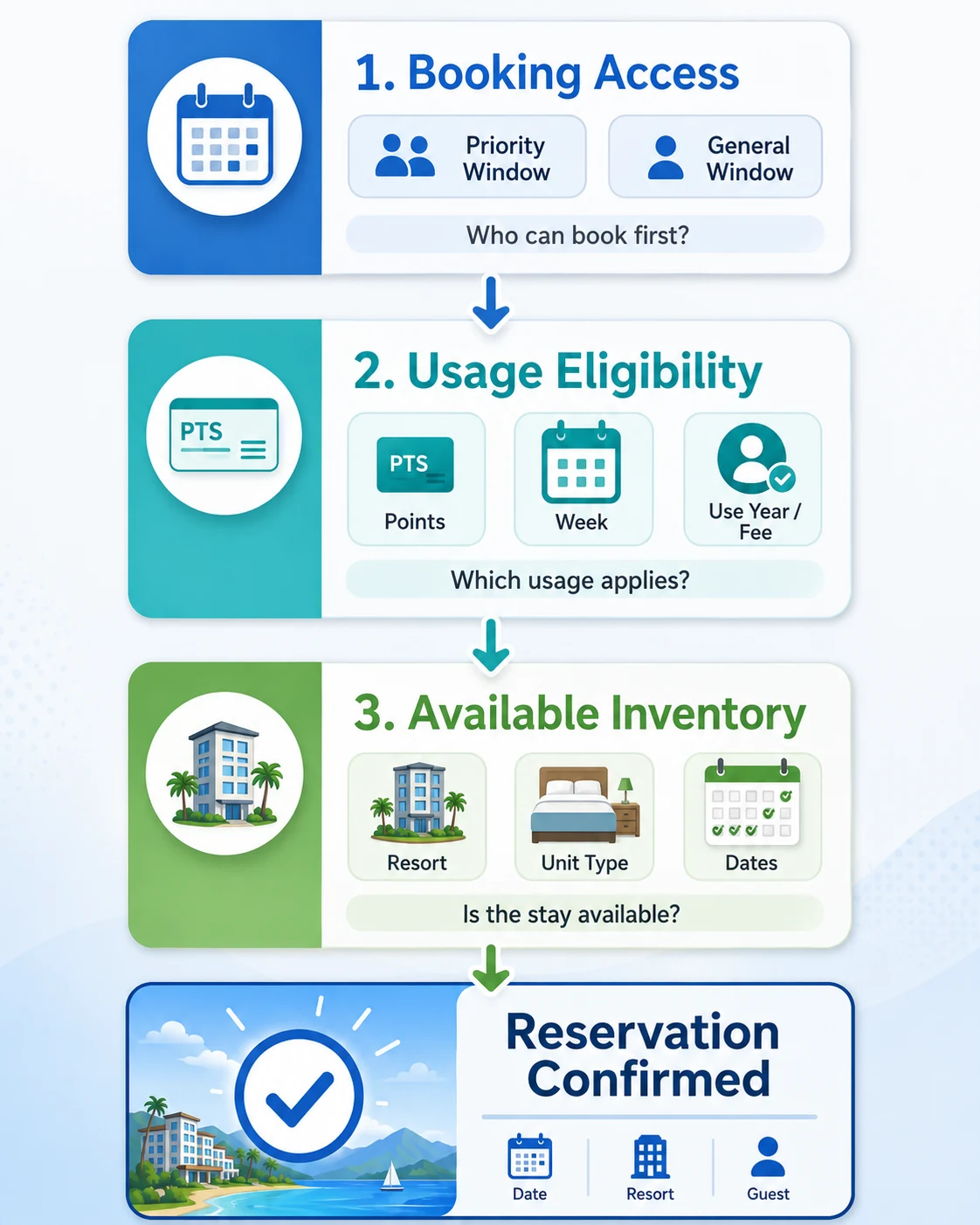
What a Timeshare Booking Window Actually Controls
A booking window establishes when an owner or member may request a reservation and which level of access applies at that time. It may determine whether the owner is searching during a resort-specific priority period, a broader club window, or a shorter-term reservation period.
Those reservation rights begin with the underlying product. See What Is a Timeshare? for an explanation of how ownership structure, vacation-use allocation, and booking access work together.
Many points-based vacation clubs give certain owners earlier access to the resort associated with their ownership before remaining inventory becomes available to the wider club. That connection may be defined by a home resort, deeded interest, trust, collection, or another program rule—not necessarily only by where the sales agreement was signed.
How It Works
How Home-Resort and General Booking Access May Open
Many points-based vacation clubs use layered reservation access. The exact priority, eligible inventory, and opening dates depend on the rules attached to the specific ownership.
Identify the Ownership Connection
The program identifies the home resort, deeded interest, trust, collection, or other inventory group associated with the ownership.
Priority Access May Begin
Eligible owners may receive an earlier opportunity to request reservations within the resort or inventory connected to their ownership.
The Wider Club Window Opens
After the priority period, remaining eligible inventory may become available to other owners or members participating in the broader club.
Availability Determines the Result
The reservation can be confirmed only when the required usage is eligible and the requested resort, unit type, and dates remain available.
TTCA Framework Insight: Earlier access improves an owner’s position in the booking sequence, but it does not guarantee a reservation. It may also provide little advantage when the owner wants a resort outside the inventory covered by that priority period.
Important Timing Difference
A Booking Window and a Use Year Control Different Things
Both may affect the same reservation, but they do not serve the same purpose. The exact definitions and restrictions depend on the program.
Reservation Access
Booking Window
When may you request the reservation?
The booking window establishes when an eligible owner or member may begin requesting a particular type of stay.
- Priority or home-resort access
- General club access
- Short-term or restricted booking periods
- Eligible reservation channels
Usage Entitlement
Use Year
Which usage may be applied to the trip?
The Use Year or usage period identifies the points, week, benefits, or paid entitlement that may cover the requested travel.
- Current or future usage
- Eligible points or week
- Expiration or movement rules
- Required usage or maintenance fees
Before You Buy More Points
Confirm What an Upgrade Would Actually Change
Additional points may increase how much usage you can spend, but they may not provide an earlier booking window, stronger resort priority, or more available inventory. The Timeshare Decision Intelligence Report™ helps organize your booking rights, ownership structure, annual costs, actual usage, and upgrade claims before you make another expensive ownership decision.
Need a clearer view of whether more points would address the real booking problem?
Review the Report Option Or continue reading about booking priority, inventory, and ownership fitDifferent Inventory Models
Some Travel Clubs Do Not Use Timeshare-Style Booking Windows
Booking windows are most relevant when owners or members compete for a defined pool of resort or club inventory. Some travel clubs instead provide access to regular hotel inventory supplied through a booking platform.
In that model, the member may not receive a home-resort priority period or an earlier general club window. Availability may depend primarily on when participating hotels release rooms and rates through the club’s supplier.
A timeshare or vacation club may use inventory connected to owner interests, resort allocations, trusts, or club inventory pools. A hotel-based travel club may instead display rooms supplied through participating hotels or third-party travel platforms.
Timeshare owners may receive earlier access based on a home resort, ownership group, collection, or another program rule. Hotel-inventory travel clubs generally do not provide that same type of owner-specific resort priority.
A travel-club member may be able to search future hotel availability but still need to pay the next usage fee or applicable maintenance fee before confirming travel outside the current usage year.
How to Determine When Your Booking Window Opens
Do not rely only on a general statement such as “owners can book 12 months ahead.” The applicable date may depend on the resort, ownership group, reservation type, length of stay, travel date, and priority attached to the specific account.
Booking Frustration
Booking at the Right Time May Still Not Produce the Vacation You Want
Opening the reservation request as soon as the applicable window begins can improve an owner’s chances, especially for high-demand travel. It cannot create inventory, change the ownership’s priority, or guarantee that the available points or week will cover the requested stay.
When booking problems continue, identify which part of the reservation structure is actually causing the difficulty before assuming that additional points or an ownership upgrade will solve it.
-
1
The requested stay may be too narrow
An exact resort, unit type, arrival date, trip length, or school-holiday period can sharply reduce the number of reservations that fit the request. Even when the owner books at the correct time, limited flexibility may leave very few workable matches.
-
2
The ownership may not provide priority for that resort
Earlier access connected to a home resort, collection, trust, or ownership group may provide little advantage when the owner wants to stay somewhere outside that protected inventory.
-
3
The destination may have limited inventory
A destination with fewer participating resorts, smaller properties, strong owner use, or heavy seasonal demand may offer far fewer realistic reservation opportunities than a market with many large participating resorts.
-
4
The ownership may not fit the way the owner travels
The program may require more flexibility in dates, destinations, unit size, or planning time than the owner can realistically provide. In that situation, the problem may be broader than booking technique.
When the same problem keeps happening
If you repeatedly follow the correct booking process and still cannot secure vacations you can reasonably use, review why timeshare availability can remain limited and whether the ownership provides priority and inventory that match your travel needs.
Booking Risk
A General Booking Rule Can Cause You to Miss the Priority That Actually Applies
A statement such as “book 12 months ahead” may leave out the ownership group, eligible resort inventory, opening time, time zone, reservation channel, or travel-date rule that controls the actual request.
Using the wrong date or process can place the owner behind other eligible requests before the search even begins. That may look like an inventory shortage or insufficient-points problem when the immediate issue is that the applicable priority period was misunderstood. Verify the exact rule before concluding that the ownership needs more points or cannot provide the intended vacation.
Action Step
Calculate the Booking Date for Your Exact Ownership
Use current program materials and the details of the trip you actually want. A general booking timeline may not reflect the priority, inventory, or reservation rules attached to your account.
Identify the exact ownership or membership involved, including the home resort, deeded interest, trust, collection, tier, or other inventory group shown in your documents.
Confirm which priority period applies to the resort, unit type, reservation channel, and travel dates you intend to request.
Verify how the opening date is calculated, including whether the program counts backward from check-in, checkout, the first night, or another date.
Check the opening time and booking channel, including the applicable time zone and whether reservations open online, by telephone, or through another owner-service process.
Confirm that the correct usage is eligible, including the points, week, Use Year, account status, and any usage or maintenance fee required for the travel period.
Review the reservation conditions before booking, including minimum stays, arrival-day limits, transaction charges, cancellation rules, modification restrictions, and any waitlist process.
Quick Win
Ask owner services to confirm the exact opening date and time in writing for one real reservation you plan to request. Save the response and place reminders on your calendar before the window opens.
Frequently Asked Questions
These questions address practical booking situations that may not be resolved by knowing the general reservation window alone.
What happens if the booking window opens on a weekend or holiday?
Do not assume the opening date moves to the next business day. An online reservation system may open on the scheduled calendar date even when owner services is closed, while a telephone-only process may follow different operating rules.
Confirm the opening date, time, time zone, and available booking channel before the window begins.
Can one reservation cross more than one booking-window date?
Possibly. Some programs calculate access from the scheduled check-in date, while others may apply rolling, night-by-night, length-of-stay, or other reservation rules. A longer stay may therefore become eligible all at once or in stages.
Ask whether the entire stay can be requested when the first night becomes eligible or whether separate reservations may be required.
Does joining a waitlist preserve the owner’s original booking priority?
Not necessarily. A waitlist may use the request date, ownership priority, membership status, unit preference, available points, or another matching process. Some programs may also impose response deadlines or confirmation requirements after a match occurs.
Verify how requests are ranked, whether points are held, and what happens if the owner declines or misses a match.
Can owner services and the online portal show different availability?
They may in some situations. Differences can result from restricted reservation channels, system synchronization, temporary holds, technical problems, release timing, or inventory that requires assistance to book.
Ask whether both channels access the same inventory pool and document any material discrepancy before assuming one result is definitive.
Can changing or cancelling a reservation cause the owner to lose it?
Yes. A cancelled reservation may return to inventory immediately, and there may be no guarantee that the same stay can be booked again. Modification rules, point restoration, cancellation fees, and restricted-use periods can also vary.
Before cancelling, ask whether the reservation can be modified without releasing the existing inventory and obtain the applicable cancellation terms in writing.
What should an owner save when booking information conflicts?
Save the current written reservation rule, the date and time of the inquiry, the representative’s name or identifier, any case number, screenshots of the portal, confirmation emails, and the exact answer provided.
When explanations conflict, ask for escalation and written confirmation of the rule that applies to the specific ownership and requested reservation.
Bottom Line
A booking window determines when you may request a reservation. It does not guarantee that your preferred resort, dates, unit type, or length of stay will be available.
A reservation generally requires three things to align: the correct booking period, eligible usage, and matching inventory. Because rules vary, verify the dates, priority, fees, and reservation channel attached to your exact ownership.
If booking problems continue even when you follow the correct process, the issue may be limited inventory, weak priority, or a mismatch between the ownership and how you travel. Before buying more points, confirm whether the purchase would improve access—or simply add more points to the same booking system.

Personalized Decision Support
Understanding the Booking Window Is Only Part of the Ownership Decision.
Booking difficulty may result from timing, reservation priority, limited inventory, insufficient usage, rising costs, or a mismatch between the ownership and the way you actually travel.
The Timeshare Decision Intelligence Report™ helps organize the ownership information, booking rights, annual obligations, usage history, upgrade claims, uncertainties, and decision considerations you provide into a personalized written report.
View the Timeshare Decision Intelligence Report™What Your Report Is Designed to Provide
- Organize the booking rights, ownership structure, and financial commitments you provide.
- Identify uncertainties, missing information, and rules that still require verification.
- Evaluate whether more points or an upgrade would address the actual ownership problem.
- Provide a personalized framework to help you evaluate your next step.
Related Guides
These guides can help you understand booking availability, compare ownership structures, evaluate exchange options, and decide whether the timeshare still fits how you travel.
Booking and Ownership Structure
- Why Is It So Hard to Book a Timeshare?
Learn how inventory limits, owner priority, seasonality, points requirements, and competing demand affect reservation availability. - Timeshare Points vs. Weeks
Compare fixed weeks, floating weeks, and points systems, including how each structure affects booking flexibility and predictability.
Ownership Value
- Is Your Timeshare Worth Keeping?
Evaluate whether the ownership’s usage, booking access, annual cost, and travel fit still justify keeping it.
Exchange Availability
- How Timeshare Exchange Programs Work
Understand how deposits, trading power, request timing, fees, flexibility, and available inventory affect exchange reservations. - Timeshare Exchange Tips
Learn how early requests, broader search criteria, destination inventory, and realistic flexibility may improve exchange prospects.